Posted on Leave a comment

How to Build a DIY Stratux ADS-B Receiver

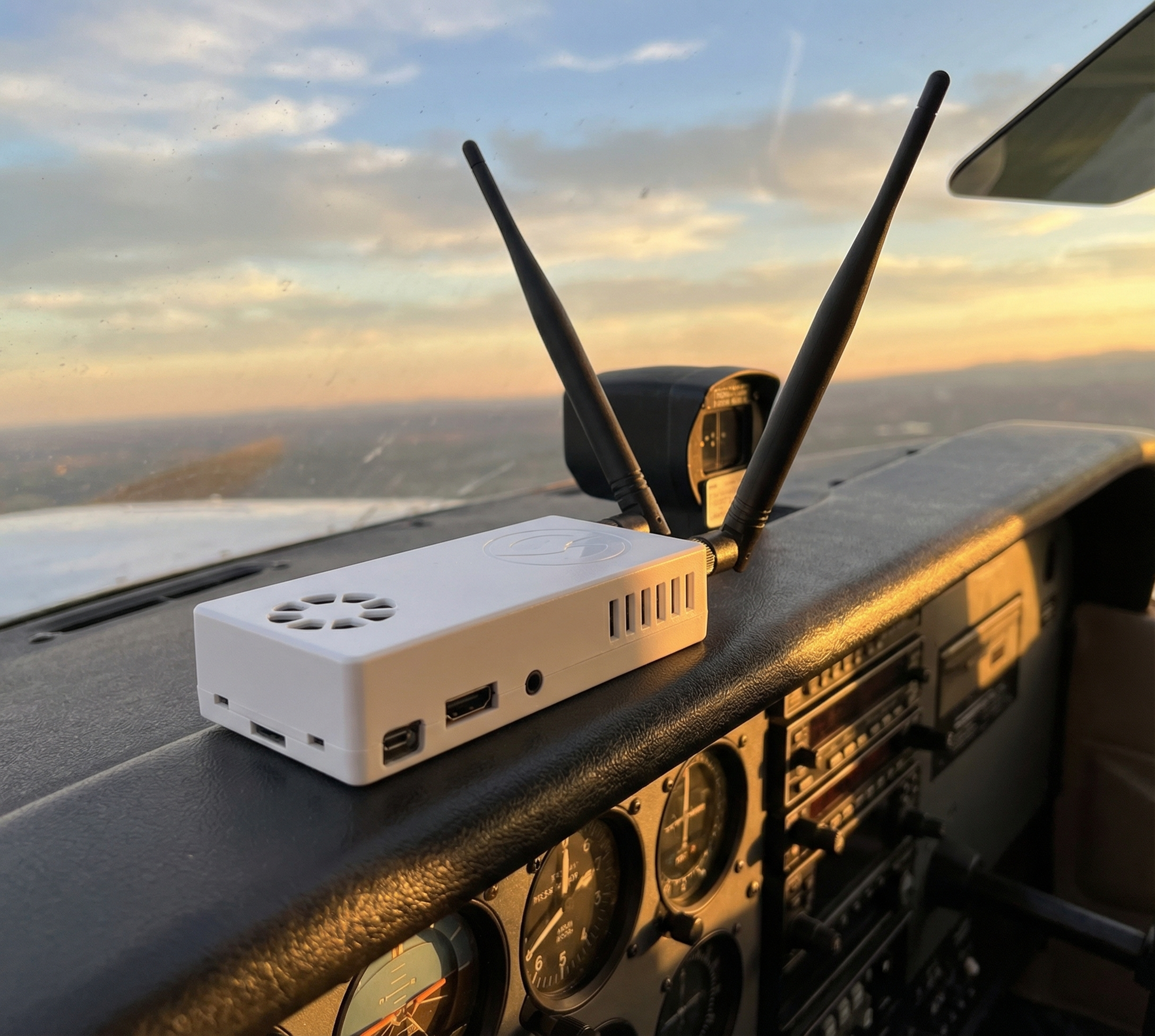
Building your own Stratux ADS-B receiver is one of the most rewarding projects a pilot can tackle. Not only will you save money compared to commercial units, but you’ll gain a deep understanding of how ADS-B technology works—and you’ll have a device that’s fully repairable and upgradeable. Think of it as the Framework Laptop of aviation electronics.

In this comprehensive guide, we’ll walk you through every step of building a dual-band Stratux receiver from scratch. Whether you’re a seasoned DIYer or picking up a soldering iron for the first time, this guide has you covered.

What You’ll Need: Complete Parts List

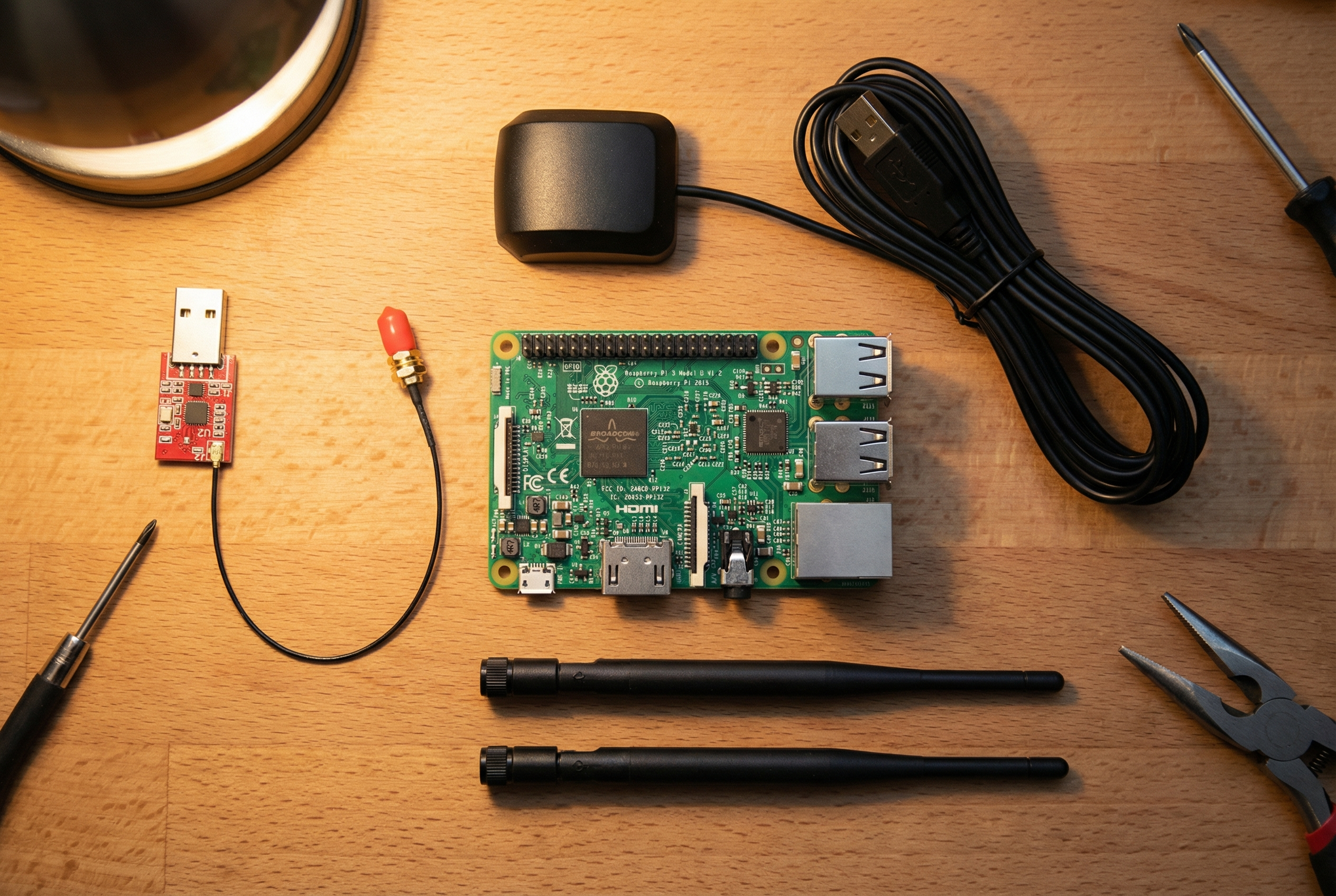
Before you start, let’s talk budget. A complete DIY Stratux build costs between $210-230, depending on your choice of Raspberry Pi and where you source components. Here’s what you need:

Core Components:

  • Raspberry Pi 4 or 5 ($35-55) — The Pi 4 2GB works great; Pi 5 offers better performance but isn’t required
  • Stratux Parts Kit (~$175) — Available from Crew Dog Electronics, includes dual SDR receivers, antennas, GPS module, and fan
  • MicroSD Card (32GB minimum, Class 10 or better) — This is your boot drive
  • Case — Either 3D print your own or purchase a pre-made case from Crew Dog
  • USB Power Cable — You’ll need reliable power in the cockpit

Optional but Recommended:

  • AHRS Module — Adds attitude and heading information, for synthetic vision and backup attitude reference — a great value-add for just $20-30
  • Battery Pack — For portable operation or backup power
  • Improved Antennas — Stock antennas work fine, but upgraded antennas can improve range

Step 1: Prepare Your Raspberry Pi

Start by downloading the latest Stratux image from the official GitHub releases page. This is a pre-configured operating system that includes all the software you need. Use a tool like Balena Etcher or Raspberry Pi Imager to write the image to your microSD card.

Pro tip: Use a quality microSD card from a reputable brand (SanDisk, Samsung). Cheap cards are the #1 cause of Stratux failures.

Step 2: Assemble the Hardware

Now comes the fun part. Here’s the assembly sequence:

  1. Install the microSD card into the Raspberry Pi’s slot on the bottom
  2. Connect the SDR receivers to two USB ports — one handles 978 MHz UAT (US weather and traffic), the other handles 1090 MHz (Mode S transponders)
  3. Attach the GPS module to the GPIO pins or via USB, depending on your model
  4. Mount the cooling fan to the case or Pi — the SDRs generate heat, especially in summer cockpits
  5. Connect the antennas to the SDR receivers — the shorter antenna is for 978 MHz, the longer for 1090 MHz
  6. Secure everything in the case — make sure nothing can shake loose during turbulence

Common Assembly Mistakes to Avoid:

  • Swapping the 978 and 1090 antennas (they’re similar but tuned differently)
  • Forgetting thermal management — your Stratux needs airflow
  • Using a low-quality USB power supply — the Pi needs 5V/3A minimum

Step 3: First Boot and Configuration

Power up your Stratux and wait about 60 seconds for it to boot. It will create a WiFi network called “stratux” (password: “stratux”). Connect your iPad or phone to this network, then open a web browser and navigate to http://192.168.10.1

The Stratux web interface lets you:

  • Monitor GPS lock and satellite count
  • See nearby aircraft and weather reception
  • Configure settings like WiFi name and AHRS calibration
  • Update firmware when new versions are released

First-flight checklist: Before you trust your Stratux in flight, verify GPS lock on the ground, confirm you’re receiving ADS-B traffic from nearby aircraft, and test the WiFi connection with your EFB app.

DIY vs Pre-Built: Is It Worth Building Your Own?

Let’s be honest about the trade-offs. A DIY build costs $210-230 and takes 2-3 hours. A pre-built Stratux from Crew Dog Electronics costs $379-449 but arrives ready to fly, with quality components, professional assembly, and a warranty.

Choose DIY if:

  • You enjoy learning how things work
  • You want maximum repairability — every component is user-replaceable
  • You’re on a tight budget
  • You might want to customize or experiment later

Choose pre-built if:

  • You value your time and want to fly now
  • You want professional build quality and support
  • You’re not comfortable with electronics assembly
  • You want the peace of mind of a warranty

Troubleshooting Your DIY Build

Most DIY builds work perfectly on the first try, but here are solutions to common issues:

No WiFi network appears: Wait a full 2 minutes for boot. Check that your Pi is getting power (look for LED lights). Try reflashing the SD card.

No GPS lock: Make sure the GPS module is properly connected. GPS needs a clear view of the sky—it won’t work indoors. Allow 5-10 minutes for the first lock.

No traffic reception: Verify your antennas are connected to the correct SDR. Make sure you’re in an area with ADS-B traffic (check flight tracking apps). The 1090 antenna should be on the R820T2 SDR.

Overheating: Ensure your fan is running and the case has ventilation holes. Consider adding heatsinks to the SDR dongles.

Next Steps: Integrating with Your EFB

Once your Stratux is built and tested, you’ll want to connect it to ForeFlight, Garmin Pilot, Avare, FlyQ, or your preferred EFB app. Most apps will auto-detect the Stratux via WiFi. In your app settings, look for “Devices” or “External GPS” and enable the connection.

Your newly built Stratux will provide:

  • ADS-B traffic on both 978 and 1090 MHz
  • FIS-B weather (NEXRAD, METARs, TAFs, TFRs, and more)
  • GPS position and altitude
  • AHRS attitude data (if equipped, providing backup attitude reference and synthetic vision capability)

The Bottom Line

Building a DIY Stratux is a satisfying weekend project that pays dividends every time you fly. You’ll have a capable ADS-B receiver that you fully understand and can maintain indefinitely. And if anything ever breaks? You can fix it yourself or order a replacement part for a few dollars.

That’s the beauty of open-source aviation electronics. You’re not locked into a proprietary ecosystem. You’re not stuck waiting for manufacturer support. You built it, you own it, and you can keep it flying for years to come.

Ready to get started? Grab a Stratux parts kit from Crew Dog Electronics and join the thousands of pilots who’ve discovered the joy of DIY ADS-B.

Blue skies and happy building!
Posted on Leave a comment

How to Set Up Your Stratux with ForeFlight: Complete Guide

You’ve just unboxed your new Stratux ADS-B receiver, and you’re ready to see real-time traffic and weather on your iPad. Great choice! But if you’ve never connected an ADS-B receiver to ForeFlight before, the setup might seem intimidating.

Don’t worry—it’s easier than programming your GPS. In this guide, we’ll walk you through the entire process, from unboxing to your first flight with live traffic and FIS-B weather.

What You’ll Need

  • Your Stratux receiver (charged or charging)
  • iPad or iPhone with ForeFlight installed
  • About 10 minutes

Note: This guide focuses on ForeFlight, but the process is nearly identical for FltPlan Go, iFly GPS, Avare, and other EFB apps. The Stratux WiFi network and settings interface work the same regardless of which app you use.

Step 1: Charge Your Stratux

Before your first use, charge the Stratux’s internal battery. Plug the included USB cable into any USB power source (wall adapter, computer, power bank) and connect it to the Stratux’s charging port.

Charging indicators:

  • Red LED: Charging in progress
  • Green LED: Fully charged

A full charge takes 2-3 hours and provides 4-6 hours of runtime, depending on configuration and temperature. You can also run the Stratux while charging if you have in-flight power available.

Step 2: Power On Your Stratux

Press and hold the power button for 2-3 seconds. You’ll see LEDs light up as the Raspberry Pi boots—this takes about 30-45 seconds.

What’s happening: The Stratux is starting its Linux-based operating system, initializing the GPS module, and firing up the SDR receivers for 1090ES and 978 UAT.

Be patient during the first boot—it may take slightly longer as the system initializes for the first time.

Step 3: Connect to the Stratux WiFi Network

Once the Stratux is fully booted (all LEDs stabilize), it broadcasts a WiFi network named “stratux” (or a custom name if you’ve renamed it).

On your iPad:

  1. Open SettingsWiFi
  2. Look for the network named stratux
  3. Tap it to connect
  4. If prompted for a password, the default is “stratux” (all lowercase)

You’ll see a checkmark next to “stratux” when connected. Your iPad may warn you that there’s no internet connection—that’s normal. The Stratux is a local network for ADS-B data, not an internet hotspot.

Pro Tip: Disable Auto-Join for Other Networks

To prevent your iPad from jumping to a different WiFi network mid-flight, go to Settings → WiFi, tap the (i) icon next to other networks (like your home WiFi), and disable Auto-Join. This ensures your iPad stays connected to the Stratux.

Step 4: Open ForeFlight and Enable ADS-B

Now that you’re connected to the Stratux WiFi, it’s time to configure ForeFlight.

  1. Open ForeFlight
  2. Tap More (bottom right) → Devices
  3. Under “ADS-B Receivers,” you should see Stratux listed
  4. Tap Stratux to select it

ForeFlight will now listen for data from the Stratux. You should see:

  • GPS: Green indicator once the GPS has a fix (may take 1-2 minutes outdoors)
  • AHRS: Green indicator (provides attitude data for synthetic vision)
  • ADS-B Traffic: Will show traffic count once aircraft are detected
  • Weather: Will populate with FIS-B data (requires ADS-B ground station in range)

Don’t panic if you don’t see traffic or weather immediately—you need to be outdoors with a clear view of the sky, and preferably in flight or at an airport with ADS-B coverage.

Step 5: Position Your Stratux for Best Reception

For optimal performance, position your Stratux with:

  • Antennas pointing up toward the sky (not sideways or down)
  • Clear view of the sky—avoid placing it under metal instrument panels or in baggage compartments
  • Away from electronic interference—keep it away from other radios, iPads, and power supplies if possible

Ideal mounting locations:

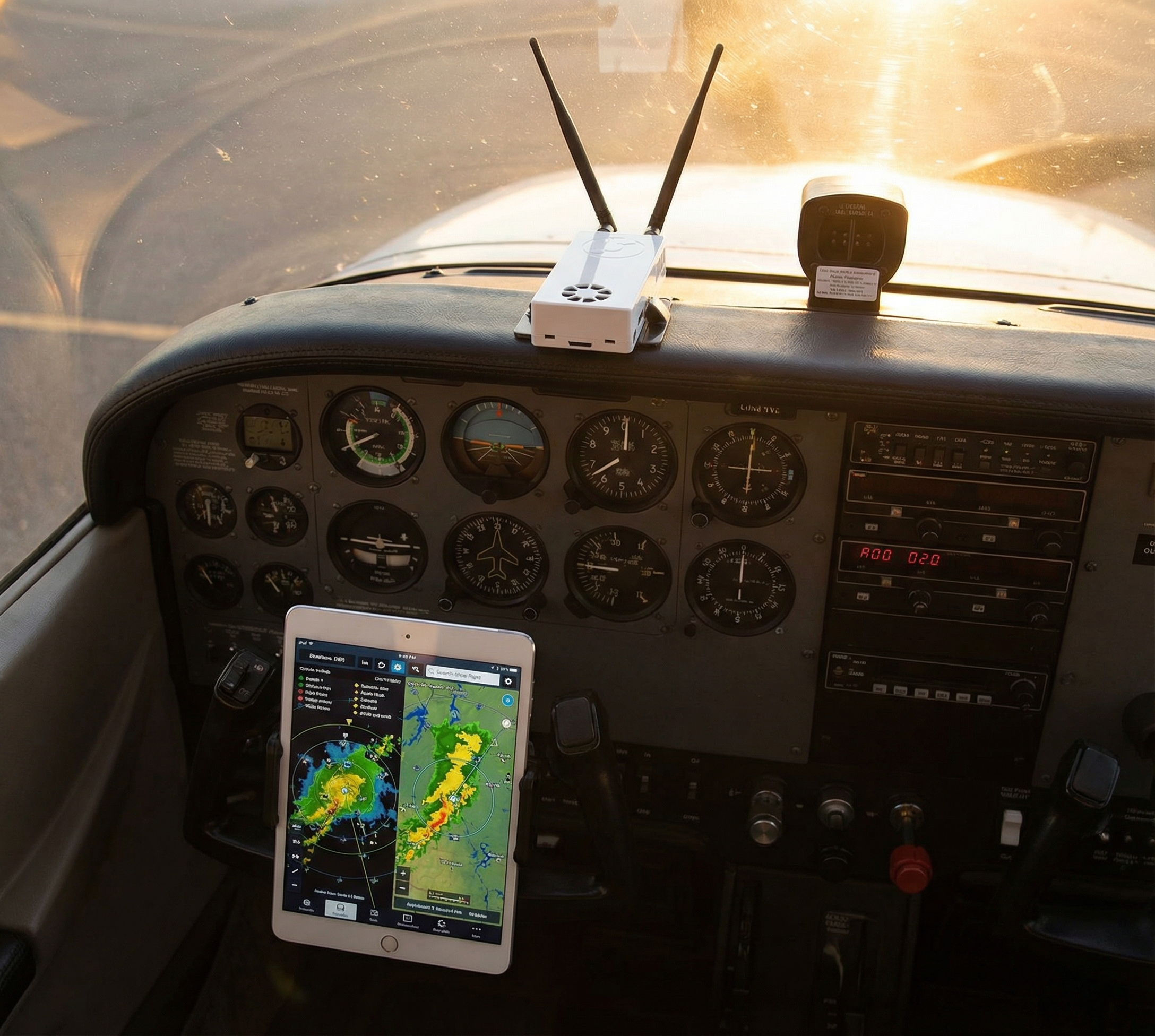
  • Glareshield (top of the panel, near the windscreen)
  • Passenger seat with antennas up
  • Window mount (suction cup or Velcro)

The better the antenna position, the more traffic you’ll see and the faster your GPS will lock.

Step 6: Check the Stratux Web Interface

The Stratux has a built-in web interface for monitoring status and adjusting settings. This is optional but incredibly useful.

To access it:

  1. Make sure you’re connected to the Stratux WiFi
  2. Open Safari (or any browser) on your iPad
  3. Go to: http://192.168.10.1

You’ll see the Stratux status page with real-time info:

  • GPS status: Satellite count, position accuracy
  • ADS-B traffic: Number of aircraft being tracked
  • Weather (FIS-B): Data products being received
  • Uptime and system info

This is your diagnostic dashboard. If something isn’t working, check here first.

Step 7: Go Fly!

You’re all set. Take your iPad and Stratux to the airport, power everything on, connect to the Stratux WiFi, and launch ForeFlight.

In flight, you’ll see:

  • Traffic icons on the map showing nearby aircraft with altitude, direction, and vertical trend
  • FIS-B weather overlays (NEXRAD, METARs, TAFs, winds aloft, etc.)
  • GPS-derived position and AHRS-derived attitude for synthetic vision

Your first time seeing live traffic pop up on the map is a game-changer. You’ll wonder how you ever flew without it.

Tips for Best Performance

1. Let the GPS Warm Up

GPS can take 1-2 minutes (or longer) to acquire a fix on the first power-on, especially indoors or under a hangar roof. Be patient. Once it locks, subsequent startups are much faster.

2. Update Firmware Regularly

The Stratux community releases firmware updates with bug fixes and new features. Check GitHub or the Stratux web interface for updates. Updating is as simple as uploading a new image file via the web interface.

3. Keep Antennas Vertical

ADS-B signals are polarized. Keeping your antennas vertical maximizes reception. If you’re consistently missing traffic, check your antenna orientation first.

4. Monitor Battery Life

Check the Stratux web interface or ForeFlight’s Devices page to monitor battery percentage. If you’re on a long cross-country, bring a USB power bank or plug into ship power.

Troubleshooting Common Issues

WiFi Network Not Appearing

  • Solution: Make sure the Stratux is fully booted (wait 45-60 seconds after powering on). If the network still doesn’t appear, the SD card may need reflashing. Download the latest Stratux image from GitHub and reflash using a tool like Balena Etcher.

No GPS Fix

  • Solution: Move outdoors with a clear view of the sky. GPS doesn’t work well indoors or under metal roofs. If it still won’t lock after 5 minutes outside, the GPS module may be loose or faulty. Check connections or contact Crew Dog Electronics for a replacement module.

No Traffic Showing

  • Solution:
    1. Check the Stratux web interface to confirm the SDR receivers are active
    2. Make sure you’re in an area with ADS-B Out-equipped aircraft (towered airports are best for testing)
    3. Verify antenna connections—loose antennas = no reception
    4. Check antenna orientation (should point up)

No Weather (FIS-B)

  • Solution: FIS-B is broadcast by ADS-B ground stations on 978 UAT. You need to be within range of a ground station (typically within 200nm of major airports at altitude). If you’re in a remote area or flying low, you may not receive FIS-B. This is normal—it’s not a Stratux issue.

ForeFlight Not Detecting Stratux

  • Solution:
    1. Confirm you’re connected to the Stratux WiFi (not cellular or another network)
    2. Close and reopen ForeFlight
    3. Go to More → Devices and manually select Stratux
    4. If still not working, restart both the iPad and the Stratux

Maintenance and Care

Your Stratux is designed to be durable, but a little care goes a long way:

  • Keep it cool: Don’t leave it in a hot cockpit for extended periods. Heat degrades battery life.
  • Protect from moisture: The Stratux isn’t waterproof. Keep it dry.
  • Update firmware: Check for updates every few months.
  • Replace parts as needed: If something fails, replacement parts are available. Don’t throw away the whole unit for a $20 component.

Final Thoughts

Setting up your Stratux with ForeFlight is straightforward: charge it, connect to the WiFi, enable it in ForeFlight, and fly. Within minutes, you’ll have live traffic and weather at your fingertips—no subscription required.

The first time you see a jet pass overhead and watch it move across your ForeFlight screen in real time, you’ll understand why ADS-B In is one of the best safety upgrades in modern GA flying.

Questions? Need help? Check out the Stratux GitHub for community support, or reach out to Crew Dog Electronics—we’re pilots too, and we’re here to help.

Fly safe, and enjoy your new eyes in the sky.

Posted on Leave a comment

What is ADS-B? A Pilot’s Guide to NextGen Surveillance

If you’ve been flying in the United States since January 1, 2020, you’ve encountered the FAA’s ADS-B mandate—whether you realized it or not. But what exactly is ADS-B, and why has it become such a critical piece of modern aviation technology?

In this comprehensive guide, we’ll break down everything you need to know about Automatic Dependent Surveillance-Broadcast (ADS-B), from how it works to why you need an ADS-B In receiver in your cockpit.

Understanding ADS-B: The Basics

ADS-B stands for Automatic Dependent Surveillance-Broadcast. Let’s unpack that mouthful:

  • Automatic: No pilot or external input required—it broadcasts continuously
  • Dependent: Relies on aircraft systems (GPS, primarily) for position data
  • Surveillance: Provides real-time aircraft tracking
  • Broadcast: Transmits information openly for anyone equipped to receive it

Think of ADS-B as your aircraft constantly announcing, “Here I am, here’s where I’m going, and here’s how fast I’m moving.” It’s replaced traditional radar as the FAA’s primary surveillance method for air traffic control.

ADS-B Out vs. ADS-B In: What’s the Difference?

ADS-B Out: The Mandate

ADS-B Out is what the FAA requires. Since January 1, 2020, all aircraft flying in most controlled airspace must broadcast their position, altitude, velocity, and other data. This is what ATC uses to track you—no more depending solely on ground-based radar.

Required for:

  • Class A, B, and C airspace
  • Class E airspace at or above 10,000 feet MSL (excluding airspace at and below 2,500 feet AGL)
  • Class E airspace over the Gulf of Mexico at and above 3,000 feet MSL
  • Within 30 nautical miles of certain Class B airports (the “Mode C veil”)
  • Above the ceiling and within the lateral boundaries of Class B or Class C airspace

ADS-B In: The Game-Changer

ADS-B In is optional, but it’s where the magic happens for pilots. An ADS-B In receiver allows you to:

  • See traffic: View other ADS-B Out-equipped aircraft on your tablet or panel-mount display
  • Get free weather: Receive Flight Information Service-Broadcast (FIS-B) weather data in real time
  • Improve situational awareness: Know what’s around you without calling ATC

Here’s the key: you don’t need ADS-B Out to benefit from ADS-B In. A portable receiver like Stratux gives you traffic and weather even if you’re flying a vintage taildragger with no electrical system beyond a handheld radio.

1090ES vs. 978 UAT: The Two Frequencies

ADS-B operates on two frequencies in the United States:

1090 MHz Extended Squitter (1090ES)

  • International standard used worldwide
  • Required for aircraft flying above 18,000 feet (Class A airspace)
  • Used by all commercial airliners and most turbine aircraft
  • Traffic only—no weather broadcast on this frequency

978 MHz Universal Access Transceiver (978 UAT)

  • Used in the US and Canada (via CIFIB towers)
  • Available for aircraft operating exclusively below 18,000 feet
  • Carries both traffic and FIS-B weather data
  • Popular with general aviation pilots

Why dual-band matters: If you only receive 978 UAT, you’ll miss all the airliners and jets on 1090ES. If you only receive 1090ES, you’ll miss GA traffic on 978 UAT and you won’t get FIS-B weather. A dual-band receiver like the Stratux Dual Band receives both frequencies, giving you complete coverage.

FIS-B: Free Weather in Your Cockpit

One of ADS-B In’s best features is FIS-B (Flight Information Service-Broadcast). This service provides real-time weather data at no cost:

  • METARs and TAFs
  • NEXRAD radar imagery (regional and CONUS)
  • PIREPs
  • Winds and temperatures aloft
  • NOTAMs and TFRs
  • AIRMETs and SIGMETs
  • Lightning data

FIS-B is broadcast on 978 UAT and updated every 5 minutes for most products. It’s not a substitute for a preflight weather briefing, but it’s invaluable for in-flight decision-making.

Why Every Pilot Should Consider an ADS-B In Receiver

Even if your aircraft is already ADS-B Out compliant, adding an ADS-B In receiver transforms your situational awareness:

  1. See and avoid: Traffic awareness is the best collision avoidance tool you can have. ADS-B In shows you traffic with precise position, altitude, and trend data.
  2. Weather awareness: Watching a line of storms develop in real time beats guessing based on a 2-hour-old briefing.
  3. Cost-effective: Portable receivers like Stratux cost a fraction of panel-mount systems and work with apps you already use (ForeFlight, FltPlan Go, iFly GPS, etc.).
  4. No subscription required: Unlike XM Weather or other satellite-based services, FIS-B is free. Forever.

Getting Started with ADS-B In: Stratux

If you’re ready to add ADS-B In to your cockpit, the Stratux receiver from Crew Dog Electronics is an affordable, proven solution. It’s an open-source receiver trusted by thousands of pilots, offering dual-band reception, WAAS GPS, and compatibility with all major EFB apps.

Best of all? It’s fully user-serviceable. Every component is replaceable, so you’re never grounded by a failed part. GPS module dies? Swap it yourself for $20. Compare that to sealed commercial units that require factory repair or replacement.

Check out the replacement parts section to see just how repairable your Stratux is.

Conclusion

ADS-B has fundamentally changed how we fly. ADS-B Out keeps you legal and visible to ATC. ADS-B In keeps you aware—of traffic, weather, and the airspace around you. Whether you fly a Cessna 150 on sunny Saturday mornings or a Cirrus on IFR cross-countries, an ADS-B In receiver is one of the smartest investments you can make.

The airspace is more crowded than ever. Make sure you can see what’s out there.